Quick Desk Guide: Structuring Youtube Chapters And Mid Video Pattern Resets
Structure YouTube chapters with 00:00, three timestamps and 10-second minimums; place mid-video pattern resets at real topic turns to protect retention.
Chapters let viewers navigate quickly while pattern resets pull attention back. Start both from one shared outline, yet never require them to line up perfectly. A chapter signals a lasting topical block. A reset signals a shift in the underlying question, supporting evidence, location, or performance energy.
What are the verified benchmarks for structuring YouTube chapters and mid-video pattern resets?
Let benchmarks guide pacing calls and pinpoint where a whoosh adds value.
| Lever | Verified benchmark | Practical editing decision |
|---|---|---|
| Assembly cleanup | Raw unscripted talking-head recordings average 15% to 22% Creator Timeline Audit & Wistia Production Data, 2025 dead air, breath pauses, and false starts. | Clean the assembly before judging chapter length or reset frequency. |
| Overall retention | Use at least 50% vidIQ & YouTube Creator Retention Study, 2025 average percentage viewed as a guardrail for 8-to-15-minute educational videos. | Move substantial proof and payoff into the middle, not only the ending. |
| Intro retention | The same benchmark pairs strong performance with at least 70% vidIQ & YouTube Creator Retention Study, 2025 retention at 30 seconds. | Do not spend the first chapter on channel housekeeping or animated branding. |
| Chapter validity | YouTube requires at least three timestamps beginning at 00:00, with every chapter lasting at least 10 seconds Google YouTube Help Documentation, 2025. | Merge tiny sections instead of publishing technically invalid chapters. |
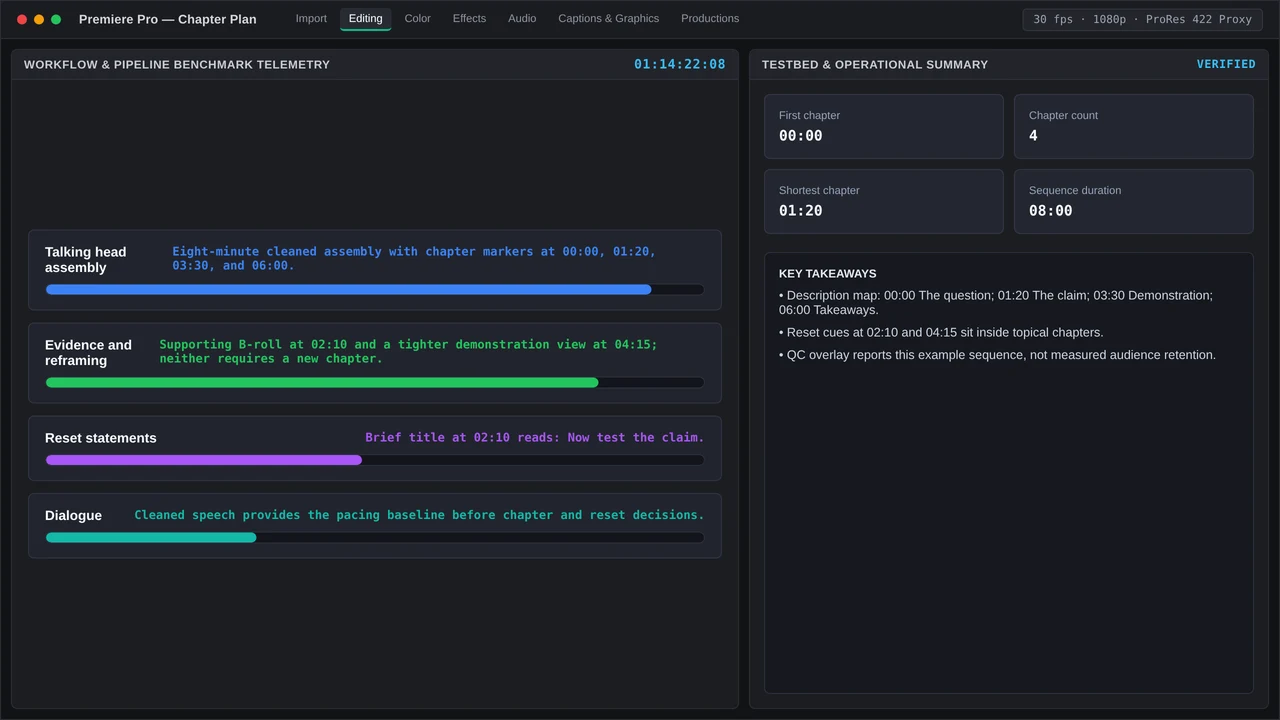
Drop resets at moments when the viewer’s underlying question shifts, such as moving from claim to demonstration, problem to example, or interview soundbite to editor synthesis. Effective reset tools include a tighter reframing, supporting B-roll, a brief full-screen statement, a change in room tone, or a J-cut that brings audio in early. Leaning on a single zoom preset over and over soon feels predictable.
Step-by-step Premiere Pro and DaVinci Resolve setup for structuring YouTube chapters and mid-video pattern resets
Premiere Pro v25/v26
- Make a duplicate of the locked assembly and name the duplicate
CHAPTER_MAP. - Open the Text panel to generate the transcript or review an existing one. Run pause and filler detection to flag potential trims, then preview each suggested cut instead of approving everything automatically.
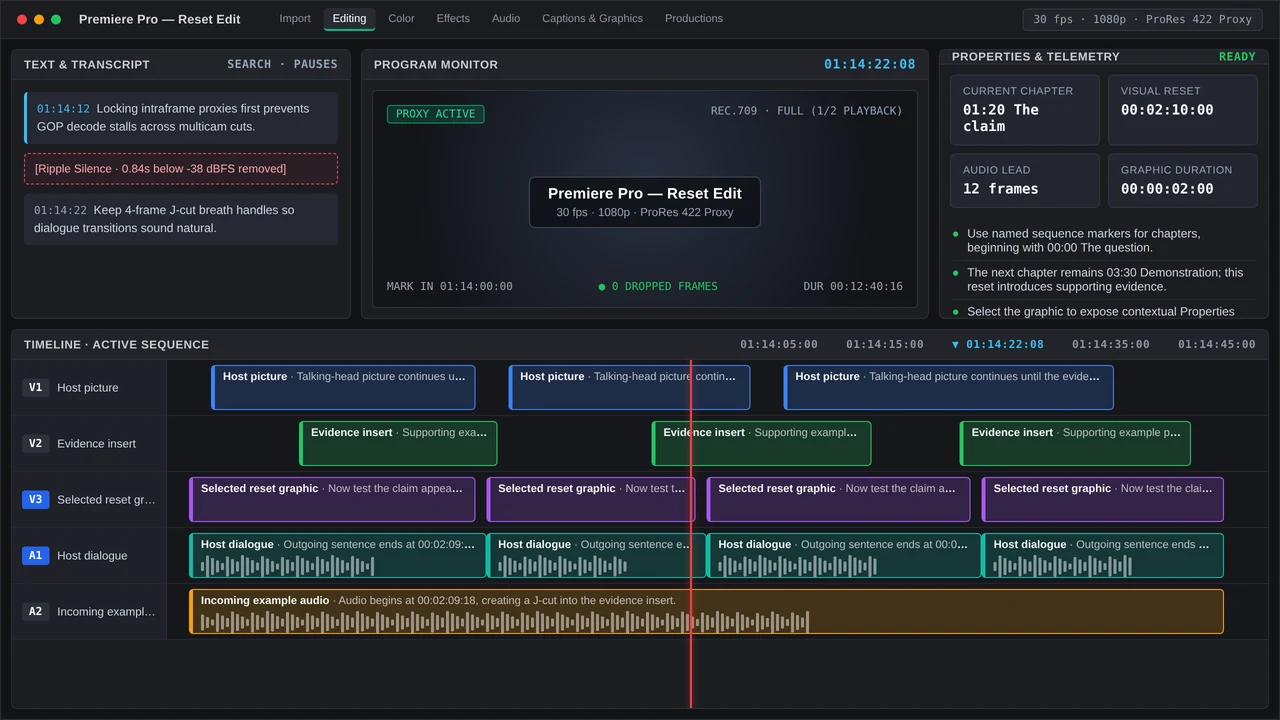
- Play back at 1x speed and drop sequence markers wherever a real topic shift occurs. Label each marker with clear, searchable chapter titles.
- Keep resets economical with a cutaway to B-roll, a subtle reframe, or a six-to-twelve-frame audio pre-lap. Tweak any selected graphic from the contextual Properties panel, and pull reusable builds from Graphics Templates.
- Once picture is locked, transfer marker timecodes into the YouTube description box. Remember that sequence markers alone will not publish chapters to YouTube.
DaVinci Resolve Studio v19/v20
- Generate a timeline transcription, then delete only verified false starts, off-topic tangents, and unusable pauses.
- In the Edit page, place timeline markers at each topic turn and assign different marker colors to distinguish chapter candidates from optional visual resets.
- Handle dialogue pre-laps and subtle transitions in Fairlight. Make sure the incoming line stays intelligible before layering music or a sound accent.
- After the final render, copy elapsed time measured from 00:00 into the description, subtracting any timeline start offset like 01:00:00:00.
Common timeline bottlenecks and QC checks when handling structuring YouTube chapters and mid-video pattern resets
Timestamp drift remains the most common failure point. Trimming the cold open late will break every timestamp that follows, so finalize picture lock before you transfer timecodes. Double-check that timestamps run in ascending order, start at 00:00, meet duration requirements, and match the final export timecode.
Reset stacking introduces another frequent bottleneck. Avoid stacking a zoom, whip pan, sound effect, caption animation, and music shift on the same beat unless the story takes a genuine turn. Ensure any B-roll stays tied directly to the claim playing on screen.
Play the export all the way through at 1x with no scrubbing. Inspect the opening 30 seconds, verify dialogue continuity over each J-cut, look for caption overlaps, and confirm each chapter title actually reflects what follows.
On client projects, sharing review links with timecode-pinned comments shrinks revision cycles to a median of 2.4 rounds Frame.io Workflow Study, 2025, versus 4+ rounds when feedback lives in unthreaded email. Plan for template maintenance outside of active cutting time as well: healthy boutique shops aim for 65% to 75% Promethean Agency Operations Benchmark, 2025 billable editor utilization. Store a set of named chapter markers plus a handful of go-to reset treatments inside your project template so the next upload starts ready.
More in RoughCut Club
Smooth talking-head jump cuts with J cuts, L cuts, 2–6-frame audio fades, room tone, and retention QC in Premiere Pro and DaVinci Resolve for YouTube.
Fix the 30-second talking-head retention dip with a 70%+ intro target, tighter pause removal, 4-to-8-frame J-cuts, and clean YouTube chapters.