Fixing the 30-Second Intro Retention Dip in Talking-Head YouTube Edits
Fix the 30-second talking-head retention dip with a 70%+ intro target, tighter pause removal, 4-to-8-frame J-cuts, and clean YouTube chapters.
In a talking-head edit, the opening 30 seconds frequently fall flat while viewers wait for the actual video to begin. The host greets the audience, repeats the channel premise, or orbits around the subject while the outcome promised in the title remains unaddressed.
Avoid trying to rescue that dip with a zoom on every line. Address it in sequence: identify the earliest line that delivers value, cut the meandering path that leads to it, tighten the dialogue edits that remain, and reserve visual adjustments for moments that communicate something specific. Save chapters for the end; chapters structure the timeline, yet chapters will not salvage a slow start.
What 30-second audience retention benchmark separates breakout YouTube videos from flat uploads?
Across 8-to-15-minute educational videos, a practical filter for breakouts pairs 70%+ 30-second intro retention with 50%+ average percentage viewed, a pairing linked to browse impressions that exceed channel baselines vidIQ & YouTube Creator Retention Study, 2025.
Treat that pairing as an initial filter. Only stack uploads against peers that share topic, traffic source, and viewer intent. A tutorial driven by browse and a troubleshooting video driven by search will often trace divergent retention curves even with identical cutting.
While scanning the retention graph, isolate which of three issues you see:
- A hard early step down: The first seconds waste time on a logo, hello, sponsor preamble, or wide context before delivering the promised payoff.
- A steady slide: Every line makes sense on its own, yet multiple lines recycle the same setup and add neither evidence nor stakes.
- A healthy opening followed by a later drop: The intro likely isn’t the culprit. Look at the transition into the first substantive section instead.
A practical fix starts cold on a concrete result, problem, or demo. After that, supply just enough context for the next action to make sense. When the title promises a fix, reveal the broken item or the completed outcome before you introduce your qualifications.
How much raw talking-head footage is dead air, false starts, and throat clearing?
Ahead of the initial assembly, unscripted talking-head source averages 15% to 22% dead air, breath pauses, and false starts Creator Timeline Audit & Wistia Production Data, 2025.
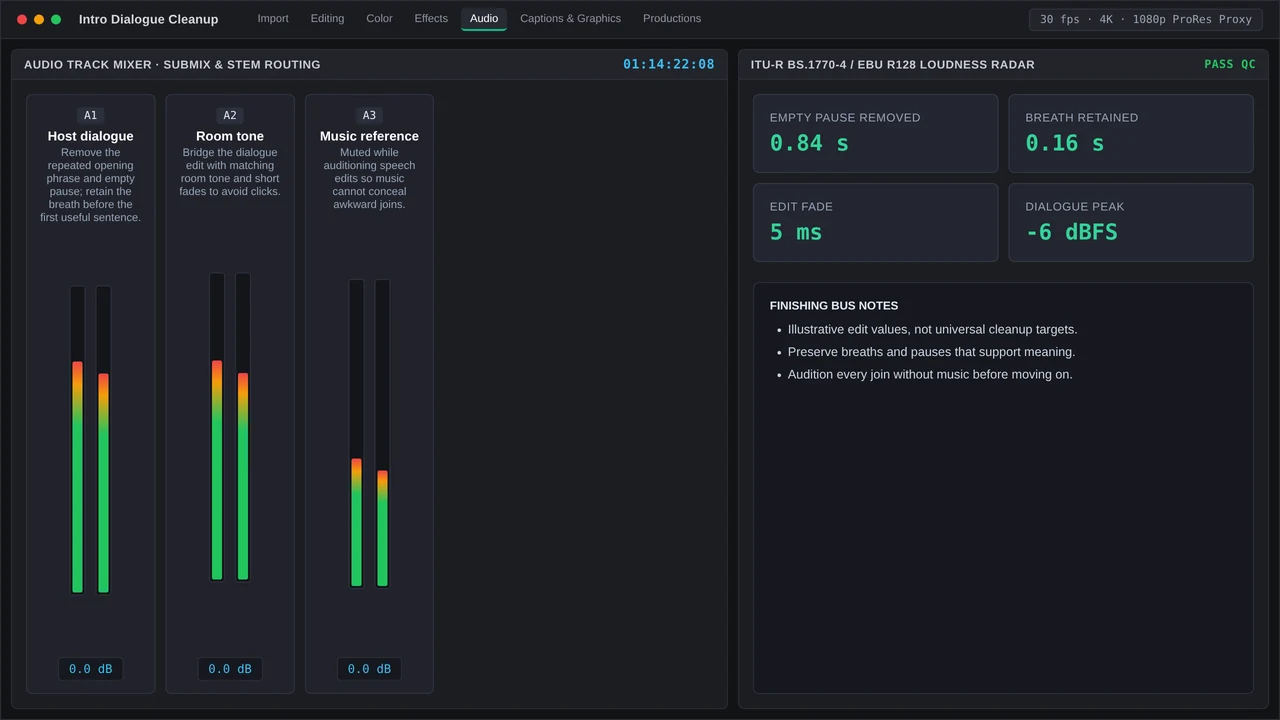
That figure does not suggest cutting every pause. Empty silence adds nothing new, while a brief breath sustains rhythm and helps a heavy explanation land. Trim accidental hesitation and preserve the natural cadence of the delivery.
Inside Premiere Pro v25/v26, a tidy rough-cut workflow runs like this:
- Duplicate the sequence and transcribe it in the Text panel. Flag the earliest sentence that provides a tangible payoff instead of merely naming the subject.
- Use Text-Based Editing to review filler, repeated takes, and pauses. Bulk detection helps surface candidates, yet audition the cut around emotional beats or precise qualifiers before you delete.
- Build the shortest coherent route through the argument. Choose the clearest complete idea ahead of the most polished single take. Even three pristine fragments can produce a tiring paragraph.
- Add restrained visual changes after the dialogue works. Use the contextual Properties panel for clip motion and reframing; turn to the Graphics Templates panel for reusable callouts and supporting visual treatments.
Plan for this as editorial craft instead of automatic filtering. Across North America and Western Europe, freelance editors bill $55 to $120 per hour ProductionHUB & Editorial Rate Survey, 2025. That same survey estimates typical post-production at 30 to 60 minutes per finished minute of polished YouTube video ProductionHUB & Editorial Rate Survey, 2025.
Structuring J-cuts, pattern interrupts, and YouTube chapter timestamps for 16-minute uploads
How should J-cuts smooth a dense talking-head timeline?
Introducing dialogue transitions with a 4-to-8-frame J-cut eases the abruptness of jump cuts in dense talking-head sequences Premiere Pro Dialogue Editing Best Practices, 2025.
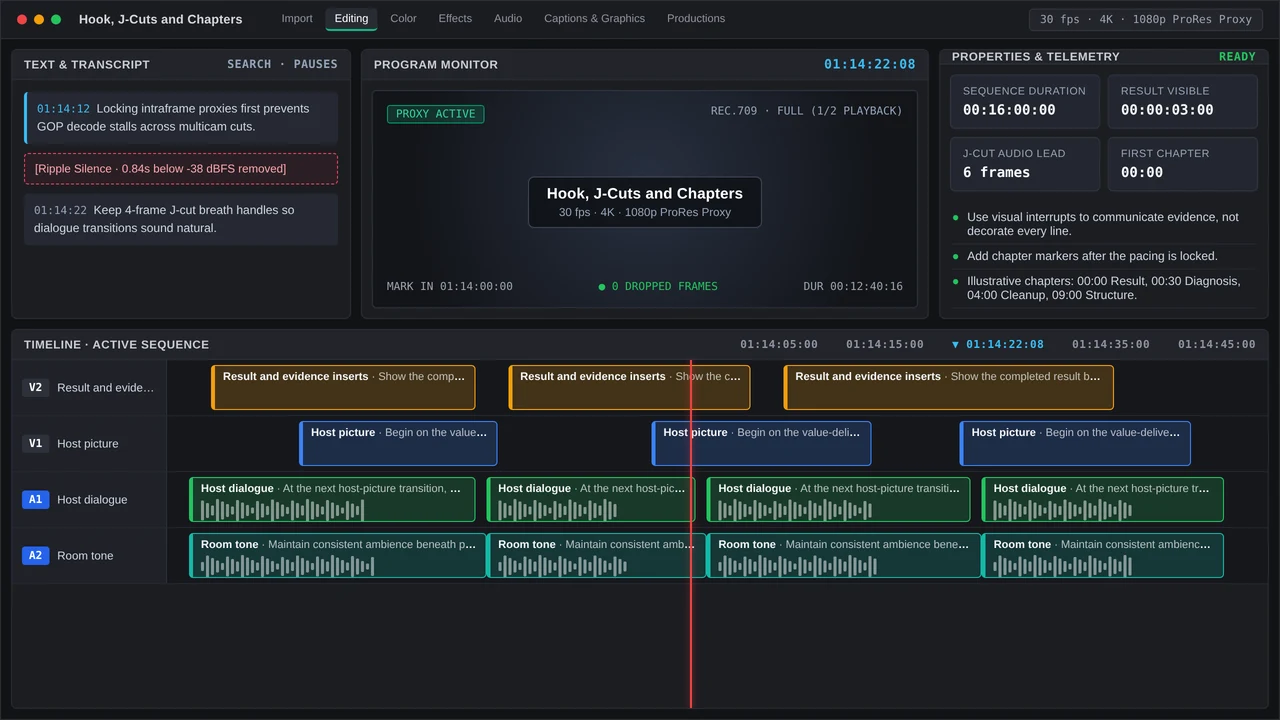
In practice, slip the audio of the upcoming thought under the outgoing picture and switch the visuals once the new sentence assumes control. That approach lets the ear lead by a moment and masks the mechanical edge between neighboring takes.
Avoid applying this reflexively. A J-cut cut from a false start just pulls the stumble in sooner. Tidy the incoming audio first, maintain consistent room tone, and retain a straight visual cut when a sharp change supplies purposeful emphasis.
Where do pattern interrupts actually help?
Reserve pattern interrupts for moments when information shifts. Four varieties consistently prove useful:
- Proof: Display the location, outcome, screen capture, or illustration whenever the host asserts something verifiable.
- Orientation: Insert a short reframe at moves from problem to method or from method to common error.
- Compression: Swap a spoken list for a legible graphic wherever the visual communicates quicker.
- Breathing room: Linger on a meaningful reaction or demo rather than trimming only because the timeline appears still.
When a zoom contributes no fresh information, that movement just accrues visual debt. Stacking them only renders the opening more jittery and no easier to follow.
How should the YouTube chapters be arranged?
YouTube chapters call for a minimum of three timestamps beginning at 00:00, and each chapter must span at least 10 seconds Google YouTube Help Documentation, 2025.
With a 16-minute cut, trial a structure like this:
00:00 Diagnose the retention dip
00:48 Find the first useful sentence
02:30 Remove false starts and dead air
05:10 Smooth the dialogue with J-cuts
08:20 Add proof-driven pattern interrupts
11:30 Build useful YouTube chapters
14:10 Run the final intro review
Position chapters at points where viewer intent pivots, and phrase labels around the task the viewer wants to complete rather than vague tags like “Part Two.”
Total runtime remains its own editorial call. Videos longer than 30 minutes average about 26% completion Wistia Video Engagement Benchmark, 2025. Concise 5-to-10-minute cuts hold 46% to 52% of viewers Wistia Video Engagement Benchmark, 2025. A thorough 16-minute tutorial earns its 16 minutes. Treat those numbers as a caution against stretching a complete answer toward excess length.
| Rough-cut pass | Approve it when | Send it back when |
|---|---|---|
| Promise | The opening advances the title’s outcome | The host is still introducing the topic |
| Dialogue | Every sentence adds context, proof, or direction | Repeated setup survives because the delivery sounds good |
| Transitions | Audio leads selected cuts naturally | Every edit has the same J-cut rhythm |
| Visuals | Inserts clarify claims or section turns | Zooms merely disguise indecision |
| Chapters | Timestamps mark useful task changes | Chapters mirror the editor’s timeline bins |
Ahead of export, play the initial 30 seconds straight through at normal speed and keep hands off the timeline. When cutting a sentence leaves viewer comprehension and expectation unchanged, cut it. In most edits, the solution comes down to a tighter route toward the promised payoff.
More in RoughCut Club
Smooth talking-head jump cuts with J cuts, L cuts, 2–6-frame audio fades, room tone, and retention QC in Premiere Pro and DaVinci Resolve for YouTube.
Structure YouTube chapters with 00:00, three timestamps and 10-second minimums; place mid-video pattern resets at real topic turns to protect retention.